DEEPWATER SIGNAL / MEETING INTELLIGENCE

Hear the meeting.
Understand the relationship.

Turn meeting transcripts and notes into a more useful account history: what was said, what was promised, what needs attention, and what to bring into the next conversation.

Start with this module. A CRM subscription is not required.

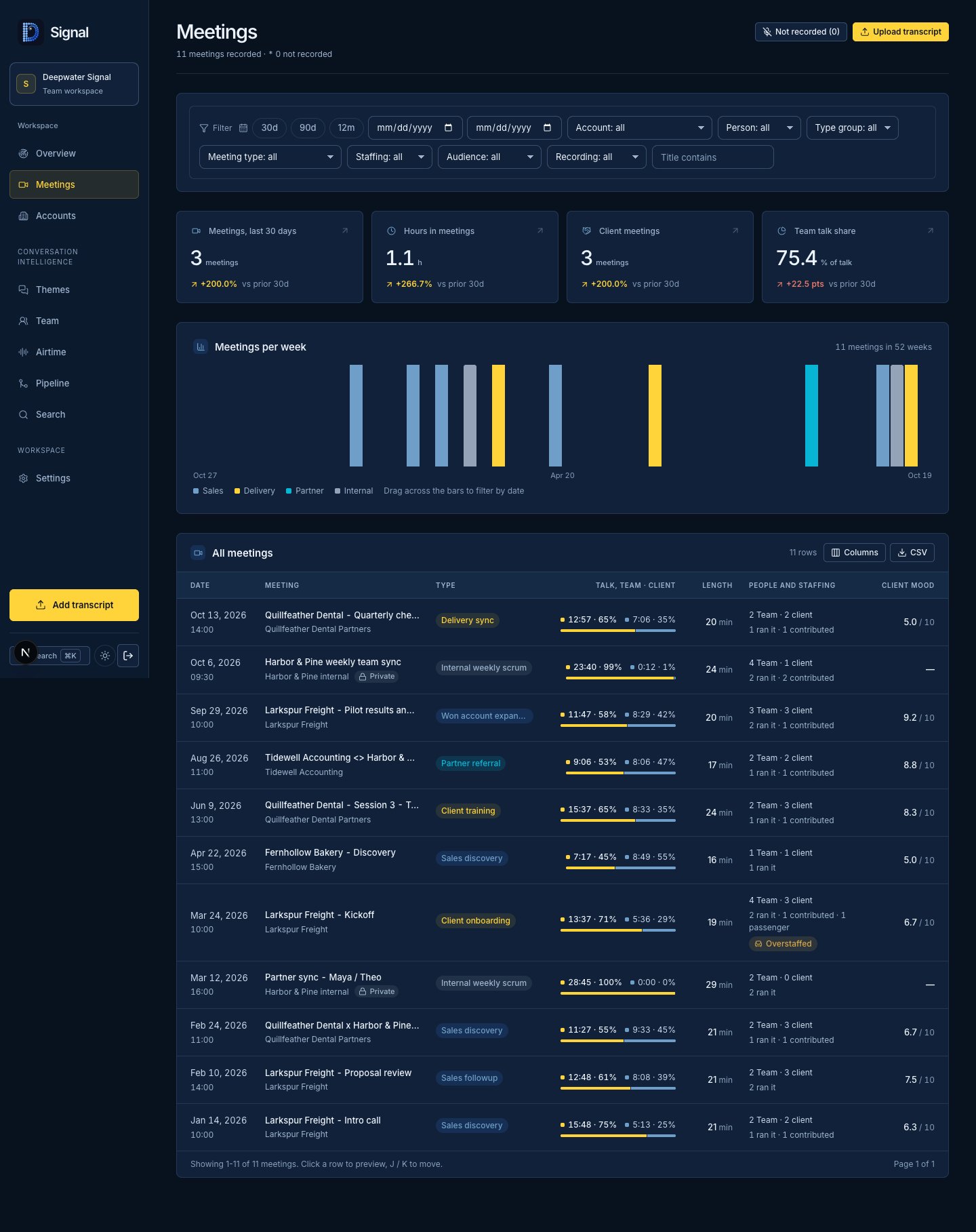
Deepwater Signal meeting workspace with fictional sample records
Deepwater Signal meeting workspace · actual app preview, fictional local data. Open full screenshot ↗

01 / MORE THAN A MEETING SUMMARY

The detail you need.
The source behind it.

Review summaries, key moments, objections, speaker participation and proposed next steps in the full Signal workspace. Use keyword and meaning search across visible meeting history, then return to the relevant meeting and timestamp to check the context.

SIGNAL / MEETING INTELLIGENCEEXAMPLE

The meeting ends.
The context stays.

SAMPLE / SERVICE REVIEW

“We can review the revised plan on Friday.”

SUMMARY

A scope revision was discussed. A follow-up review was proposed.

PROPOSED NEXT STEP

Share the revised plan. Confirm the owner and review date.

Go back to the source. Review the interpretation.

Synthetic illustration, not a live meeting or accuracy claim.

01

Bring the meetings you already have.

Import supported transcript and notes files, or configure a Google Drive source for Meet notes and transcripts. Processing and source access are part of the agreed setup.

02

Understand the conversation.

Find decision-relevant moments, pains, objections and commitments. AI analysis supports review; it does not replace the source or a person’s judgment.

03

Separate airtime from leadership.

See participation and talk-time detail alongside meeting roles. Speaking the most does not automatically mean someone ran the meeting.

SUPPORTED TRANSCRIPT SOURCES
VTTSRTJSONTEXT / NOTES

02 / PRIVACY WITHIN THE CONVERSATION

Share the learning.
Respect the boundaries.

Signal applies visibility to passages within a meeting, rather than relying only on access to the whole call. Organization-defined rules and review determine which content reaches team views, search, summaries and MCP tools.

CONTENT-LEVEL VISIBILITY

A useful history.
With boundaries.

Team-visible discussion

Project scope and agreed next steps.

VISIBLE
Private passage

Content withheld from team read paths.

SEALED
Team-visible discussion

Follow-up review and open questions.

VISIBLE

Illustrative visibility states. No transcript data.

Unclassified or uncertain passages stay private until cleared. Owners can review visibility. Privacy setup needs to reflect your organization’s rules.

03 / SALES, DELIVERY & THE NEXT CONVERSATION

Remember the promise.
Prepare the next move.

Account briefs bring the visible history together before the next conversation. Open commitments distinguish fresh work from older, stale promises, so yesterday’s unfinished item is not mistaken for today’s priority. Follow the relationship from discovery through delivery and renewal.

FROM ONE CALL TO THE RELATIONSHIP

What changed?
What is still open?

DISCOVERY
Understand the need

Find pains, objections and useful moments.

DELIVERY
Keep the promises visible

Review owners, commitments and open work.

ACCOUNT REVIEW
Prepare with the history

Review account context before the next meeting.

Workflow illustration. CRM account linking requires configuration.

CHOOSE THE RIGHT SCOPE

The full Signal workspace handles meeting intelligence. Deepwater’s embedded Signal module provides a connected overview when licensed, enabled and configured. Detailed analysis and search depend on the Signal service and the integrations agreed for your installation.

CRM linking connects accounts to companies. It does not automatically write meeting actions into CRM.

PART OF THE BUSINESS INTELLIGENCE LAYER

Your conversations.
The bigger picture.

CRM, Signal, Funnel and Cards connect through one stateless MCP. Hours, Computer, Net and Learn are coming soon; their connector capabilities are being scoped. Connect your AI tools once, then ask simple questions across your business with your organization’s permissions in place.

See your business from one connector

START WITH THE WORK YOU WANT TO IMPROVE

Choose the module.
Shape the implementation.

We agree the workflows, source access, configuration and handover. Choose hosted SaaS or a separately scoped self-hosted installation.

  • Hosted access and implementation are separate.
  • Provider costs and custom work are scoped with you.

DEEPWATER SIGNAL / HOSTED PLANNING ESTIMATE

$199 / month

Per workspace. Source connections are configured during setup.

One-time implementation, from$500

Published prices are USD planning estimates; unpriced modules require a separate quote. Your proposal confirms scope, capacity and availability. Self-hosted licensing and support require a separate quote.

Explore pricing & implementation